Your inbox shouldn't feel like a second job
When 600+ emails land in your inbox every day, your team spends more time sorting and responding than actually helping patients. EmailTag changes that. It reads, understands, routes, and responds to routine messages automatically—so your staff can focus on the cases that truly need a human touch.
Real results from real inboxes
For a California-based medical imaging provider handling 600+ emails daily, here's what changed after deploying EmailTag:
Routine scheduling, records, and billing inquiries resolved without staff intervention.
That's over 3 full-time employees worth of work redirected to complex cases.
Down from 4-6 hours. Patients get answers while the question is still fresh.
Faster, consistent responses mean happier patients and fewer follow-up calls.
The problem we kept hearing
“We're drowning in emails.” That's what operations leaders tell us. Their teams spend hours every day reading messages, figuring out what they're about, tagging them, forwarding them to the right department, and typing out the same responses over and over. Meanwhile, patients wait. Staff burn out. And the inbox just keeps filling up.
The thing is, most of these emails aren't complicated. They're appointment confirmations, records requests, billing questions, lien submissions—predictable stuff that follows clear patterns. The problem isn't that they're hard. It's that there are so many of them.
How EmailTag helps
EmailTag connects to your CRM (like FrontApp) and watches every incoming message. When an email arrives, it reads the content, scans any attachments using OCR, and figures out exactly what the sender needs. Then it takes action:
- Tags and routes automatically. No more manual sorting. Each email lands in the right inbox with the right tags, instantly.
- Drafts compliant responses. For routine requests, EmailTag generates replies using your approved templates—complete with patient-specific details pulled from your systems.
- Escalates when needed. Complex cases, sensitive requests, or anything that needs human judgment gets flagged for staff review with full context attached.
- Keeps a complete audit trail. Every decision—what was tagged, why, what was sent—is logged for compliance and quality review.
Templates you control
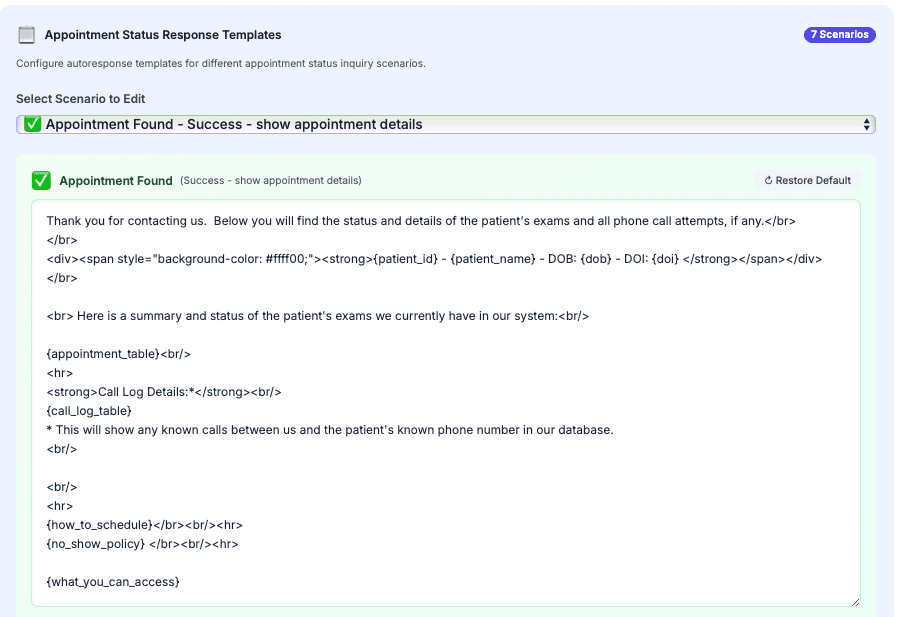
Your responses should sound like you, not a robot. That's why EmailTag lets you define exactly how replies are written. Set up templates for each type of request—appointment confirmations, records releases, billing inquiries—with placeholders that automatically fill in patient names, dates, and other details. Your team can tweak the wording anytime without touching any code.
Preview before sending
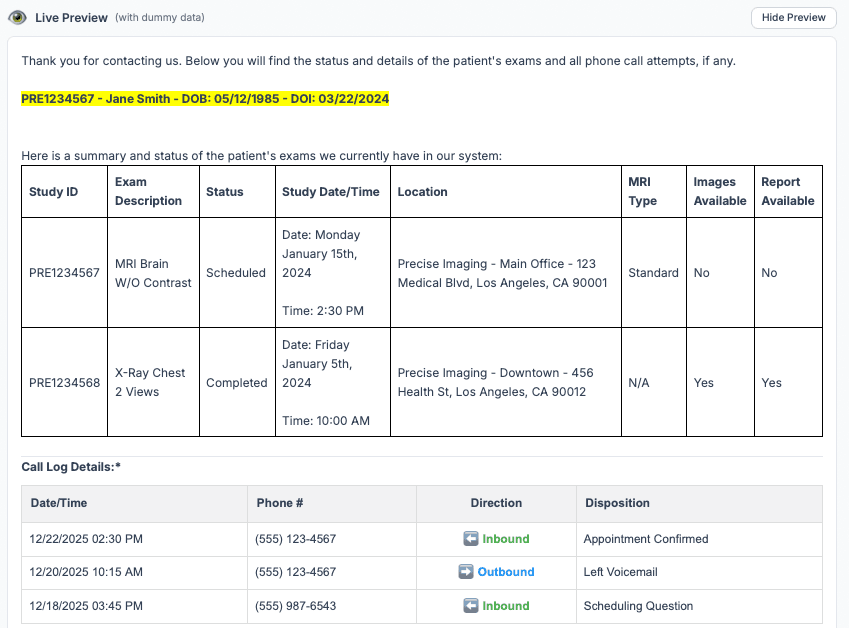
Nobody wants to send an email with the wrong patient name or a broken placeholder. EmailTag shows you exactly what the final message will look like—with real data filled in—before anything goes out. Your staff can review, adjust if needed, and approve with confidence.
Smart document handling
Attachments aren't just files to EmailTag—they're information. The system reads PDFs, scans images, and extracts key details automatically. For medical imaging providers dealing with liens and legal documents, this means:
- Barcodes are scanned to pull patient IDs, lien types, and referrer information
- Signatures are detected and validated for proper placement
- Modifications like strikethroughs are flagged for review
- Suspicious or non-standard documents get automatically tagged for closer inspection
Built for compliance
Healthcare means HIPAA, and HIPAA means being careful. EmailTag verifies senders before sharing any protected health information. If something doesn't check out, the system fails safely—no data leaves without proper authorization. Every response uses pre-approved language, and every action is logged for audits.
Your team stays in control
Automation doesn't mean giving up control. Staff can review any message before it's sent. Low-confidence classifications get flagged for human review. And you decide which categories get automated responses versus which ones always need a person. The AI handles the volume; your team handles the judgment calls.
What kinds of emails does it handle?
Pretty much anything that follows a pattern. Our clients use EmailTag for:
- Scheduling requests and appointment status checks
- Medical records and imaging release requests
- Billing inquiries and balance questions
- Lien submissions and document processing
- Case updates and attorney correspondence
- Payment negotiations and collections routing
The bottom line
Your staff didn't sign up to be email sorters. They signed up to help patients. EmailTag gives them that time back—hundreds of hours every month that can go toward the work that actually matters. Patients get faster answers. Staff get less busywork. And your inbox finally feels manageable.
See it in action
Learn how a California medical imaging chain used EmailTag alongside our AI chatbot to cut support workload by 62% and boost patient satisfaction by 41%.